Discover top drawing aids that help artists transfer proportions, values, and details with greater ease. This guide highlights five versatile tools—perfect for beginners learning to sketch, students building technical accuracy, and pros refining their workflow. Each product section explains who it’s best for, why it was selected, and a practical limitation to consider. See the quick summary table below for a snapshot of the options.
| Product | Ideal For | Why It Stands Out |
|---|---|---|
| LUCY Flex Drawing Tool with Photo Enlarger | Realistic drawing from life and enlargements | Large adjustable image, multiple brightness levels, 3x photo magnification |
| Pixiss Grey Scale Value Finder & Color Wheel | Accurate values and color planning | Portable, integrated lanyard, fast reference for value and color coordination |
| Yuntec Optical Drawing Board | beginners and students | PMMA lens projection with app support for sketches |
| Accurasee Proportional Divider | Precise proportion transfer | Upgraded with more ratio options and easy locking |
| ZTEOFO Circle Templates | Geometric patterns and drafting | Two-pack of durable circle templates for quick geometry |
LUCY Flex Drawing Tool With Photo Enlarger

The LUCY Flex is designed for artists who want a versatile projector-like aid without the complexity of a traditional camera lucida. It “reflects an image” of objects or scenes, enabling you to draw over a projected guide. Best for artists who enjoy drawing live objects, portraits, or landscapes with minimal setup. The tool supports drawing on paper, canvas, or any surface, and works with many media types.
Why it’s selected: It combines a large, stable image surface—up to 19 x 27 inches for life drawing and 12 x 18 inches for photo enlargements—with adjustable brightness via two filters. The built-in photo enlarger scales photos up to 3x, turning a small print into a ready-to-draw large format. The included bag adds portable convenience for plein air or studio use.
Caution: Larger image sizes require a steady hand and a stable workspace. While it reduces shadows and the need for a darkroom, edge handling for fine lines may still require careful tracing or blending with your preferred mediums.
Pixiss Grey Scale Value Finder & Color Wheel

This small, pocket-friendly kit is ideal for artists who want reliable reference tools without bulky equipment. The lanyard attachment keeps the color wheel, gray scale cards, and viewfinder within easy reach, making it practical for on-the-go sketching. The gray scale finder helps determine color values, while the color wheel assists with color relationships and harmony.
Why it’s selected: The combination supports quick decision-making on value and color, which is especially helpful for lighting studies, portraits, and still lifes. It’s a lightweight way to introduce objective references into your workflow.
Limitation: The set size is compact; very large-scale projects may require larger scale references or additional tools for detailed accuracy.
Yuntec Optical Drawing Board
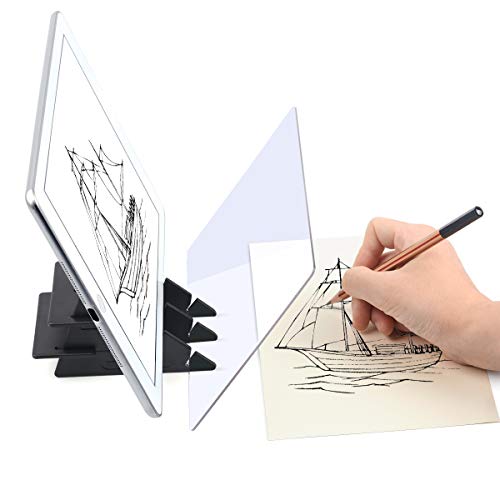
The Yuntec Optical Drawing Board uses a PMMA lens to project a reflected image onto a surface you’ll draw on. It’s suitable for beginners and students who want a simple, low-noise way to trace or convert images into sketches. An accompanying app package can convert the projected image into a sketch with adjustable features, expanding its utility beyond basic projection.
Why it’s selected: The combination of a durable PMMA lens and an accompanying app allows for multiple workflow options—from direct tracing to digital-assisted sketching. The device is compact enough for classroom use or a dedicated studio corner.
Limitation: The app’s features vary by language and device; users should verify compatibility with their smartphone or tablet before purchase.
Accurasee Proportional Divider

The Proportional Divider helps artists transfer proportions accurately from a reference to the drawing surface. This upgraded version provides more ratio options and durable pointers, making it a robust choice for detailed work, perspective drawing, and geometric studies. Locking features help maintain consistency across multiple elements of a composition.
Best for: Artists who want precise scaling in still lifes, landscapes, and architectural sketches. The tool’s ability to lock in a consistent ratio reduces guesswork and improves overall accuracy.
Limitation: It requires careful handling to keep the scale constant during transfers; users should avoid forcing the tool beyond its designed tolerances, which could distort proportions.
ZTEOFO Circle Templates Geometric Drawings

This two-pack of circle templates provides quick access to precise circles and arcs for geometric drawings, drafting, and decorative patterns. Made from durable plastic, these templates are lightweight and easy to carry for field work or classroom use. They’re especially useful for designers and illustrators who require repeated circular shapes with consistent radii.
Best for: Rapid geometric drafting, logo design, or architectural detailing where circles and arcs are frequent elements. They enable clean, repeatable shapes without tracing freehand.
Limitation: Templates are limited to predefined radii; for unusual curves, you may need additional tools or manual tracing.”
Buying Guide
What should you consider when choosing a drawing aid?
- Purpose: Do you need projection for accuracy, color and value planning, or geometric aids for measurements?
- Portability: Will you sketch at a desk, in a classroom, or on location?
- Ease of use: Are you comfortable with digital apps, or do you prefer purely mechanical tools?
- Size and scale: For large works, choose tools that support bigger surfaces or give you scalable options.
- Durability and material: Look for sturdy plastics or metal components for long-term use.
Comparison at a glance
- Best for live drawing with enlargements: LUCY Flex Drawing Tool with Photo Enlarger
- Best for on-the-go value reference: Pixiss Grey Scale Value Finder & Color Wheel
- Best for beginners and students: Yuntec Optical Drawing Board
- Best for precise proportion transfer: Accurasee Proportional Divider
- Best for quick geometric patterns: ZTEOFO Circle Templates
Usage tips for maximizing results
- Combine tools: Use the LUCY Flex for large-scale transfer and the Accurasee Divider for maintaining consistent proportions in detailed areas.
- Prepare your workspace: A stable surface and good lighting improve accuracy when projecting or tracing.
- Practice with values: Use the Pixiss gray scale to set correct tonal relationships before applying color.
- Keep accessories organized: Attach frequently used items to a lanyard or tote for quick access during sessions.
FAQ
- Are drawing aids necessary for beginners? They help establish accuracy and reduce frustration, especially when learning proportion and perspective.
- Can these tools replace freehand drawing? They complement freehand work by providing references, not replacing creative experimentation.
- Do these tools work with digital art as well? Some items offer app compatibility for digital sketching or conversion to sketches.
- Will using a projector-type tool cause shadows on the drawing surface? Proper setup minimizes shadows; some models avoid bulbs entirely by design.
Add a Comment