Answering the needs of designers, drafters, and architecture students, this guide highlights five drawing boards that excel at precise lines, adjustable angles, and portable setup. Each option targets a different drafting style or workspace size, making it easy to pick the best match for your typical projects. The top picks cover medium to large boards, a versatile portable choice, and a compact easel for quick sketches.
Summary table of selected products
| Product | Best For | Size | |
|---|---|---|---|
| Acurit Multi-Angled 20″x26″ Drawing Board | Tabletop drafting, compact studios | 20″x26″ | Precise parallel motion bar with 7 angles |
| Acurit Multi-Angled 24″x36″ Drawing Board | Architects and engineers needing more work area | 24″x36″ | Laminated surface, large workspace |
| Zonon A4 Portable Drawing Board | Field work, travel, quick note-taking | A4 (approx. 15.75″x11.81″) | Lightweight, portable, includes essential tools |
| Acurit Fixed-Angled 24″x36″ Drawing Board | Professional drafting with fixed angle | 24″x36″ | Parallel motion bar, durable laminated surface |
| Falling in Art 5 Position Wood Drafting Table Easel | Budget-friendly, compact sketching | 16.5″ x 12.1″ | Wood easel for versatile positioning |
Acurit Multi-Angled 20″x26″ Drafting Board

The 20″x26″ planing board offers precise parallel-line control via a fitted motion bar. This supports accurate horizontal lines and aligned layouts, essential for detailed drafting. The adjustable frame provides seven drawing angles up to 45°, making it suitable for seated work or desk setups. Rubber feet and a durable handle aid with stability and transport between work areas. The 17mm laminated surface resists scratches and cleanup is simple, maintaining a consistent feel over time. Best for: small studios or desks where precise lines are critical and space is limited. Caution: smaller size may feel cramped for large-scale drawings.
Acurit Multi-Angled 24″x36″ Drafting Board
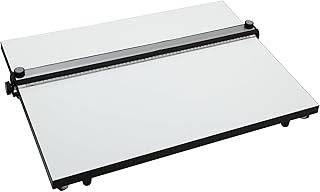
This larger Acurit board provides expanded real estate for complex layouts and technical drawings. It retains a parallel motion bar for precise line control and includes a laminated, durable surface. Best for: professionals needing more room for large-scale drafts. Choose this if you regularly work on sizable plans and want consistent line quality across a bigger sheet. Caution: heavier and less portable than smaller models.
Zonon A4 Portable Drawing Board

The Zonon A4 board is compact and highly portable, suitable for on-the-go sketching and fieldwork. It features a hard plastic construction with a clear ruler and parallel motion, plus an angle-adjustable tilting table and non-slip feet. Includes a protractor, straightedge ruler, and L-shaped drafting square. Best for: students and professionals who need a lightweight, all-in-one drafting setup. Better for quick drawings and note-taking away from a full studio. Caution: limited surface area may hinder large, detailed projects.
Acurit Fixed-Angled 24″x36″ Drafting Board
This fixed-angled model suits professionals who prefer a steady drawing angle without adjustability. It preserves a parallel motion bar for accurate line work and a laminated surface that resists wear. Best for: drafting studios or desks where a consistent angle is required. Choose this if you prioritize a stable, fixed orientation over adjustable positioning. Caution: lacks adjustable angles, which may limit ergonomic options for different postures.
Falling in Art 5 Position Wood Drafting Table Easel

This wooden easel provides five-position versatility in a compact footprint. Made from European beech, it offers stability for drafting and sketching while remaining lightweight. Best for: budget-conscious users who need a sturdy, multi-position easel for smaller works or classroom settings. Better for: quick studies and demonstrations. Caution: wood construction can be less durable under heavy, prolonged use compared to metal boards.
Buying Guide: Key Considerations For Your Drafting Board
- Size matters: Choose a board size that matches your typical paper formats and drawing scale. Larger boards reduce rework for big plans but require more desk space and transport.
- Surface quality: A laminated or melamine surface resists stains and scratches and is easier to clean, preserving line fidelity over time.
- Motion and angles: A parallel motion bar ensures straight, repeatable lines. Consider whether you need adjustable angles or fixed settings to fit your posture and workflow.
- Portability: If you move between rooms or travel, prioritize lighter weights, foldable frames, and carrying handles.
- Material resilience: Metal frames offer durability and stability; wood can be lighter and more economical but may require care to prevent warping.
- Included accessories: Rulers, protractors, squares, and clamps enhance usability; ensure they suit your preferred drafting method and paper size.
- Workspace integration: Ensure the board height, tilt options, and edge clearance work with your chair height and desk configuration.
Frequently Asked Questions
- What is the best board for detailed architectural drafting?
A board with a precise parallel motion bar and a large laminated surface is ideal for accurate lines and bigger layouts. - How important are adjustable angles?
Adjustable angles improve ergonomic comfort and can reduce strain during long drafting sessions, but fixed-angle boards offer consistent results for standard projects. - Is portability a priority for fieldwork?
Yes. Look for lightweight boards with carrying handles and a compact footprint for easy transport between sites. - Should I buy a wood easel or a metal board?
Wood easels are budget-friendly and suitable for light use, while metal boards generally provide greater durability for regular, heavy drafting. - Do these boards support painting or mixed-media work?
Most laminated surfaces handle ink and pencil well; check each product’s surface compatibility if painting is common in your workflow.
Add a Comment