Choosing the right home vinyl cutting machine depends on your projects, budget, and experience. This guide highlights five versatile options suitable for beginners, hobby crafters, and small-business DIYers. Each option supports common materials—vinyl, HTV, sticker stock, and more—and offers practical features to streamline design and cutting. The following table summarizes key notes to help you compare quickly.
| Product | Best For | Cutting Width | Notable Feature |
|---|---|---|---|
| VEVOR Vinyl Cutter 34″ Bundle | DIY signage and large designs | 34.3″ paper feed, 30.7″ cut | LCD controls, adjustable pressure |
| VEVOR Cutting Machine (Edge Detection) | Custom crafts with templates | 450mm max feed, 330mm cut | Automatic edge detection |
| Silhouette Cameo 5 Alpha | Precision home projects | Standard cutting area for home use | 4-point alignment, IPT optimization |
| Liene PixCut S1 | All-in-one sticker maker | Printer/cutter integration | Thermal dye-sublimation option |
| Cricut Joy Xtra | Compact, versatile home crafting | Small-to-medium formats | Draws and cuts, design-space integration |
Below you’ll find in-depth overviews of each option. Each product section explains who it’s best for, why it was selected, and a practical limitation to consider.
VEVOR Vinyl Cutter 34 Inches Bundle

The VEVOR 34-inch Bundle targets crafters who need large cutting capacity for signage, banners, and multi-material projects. Best for: hobbyists creating bigger decals or professional-like signs at home. This model offers a wide paper feed, precise cutting with +/-0.01 mm accuracy, and adjustable cutting pressure (20-500 g) and speed (20-800 mm/s). It includes Signmaster-compatible software and a robust drive system with double spring pinch-rollers for stable feeding. A potential limitation is the bulk and setup complexity for very small projects.
VEVOR Cutting Machine With Edge Detection
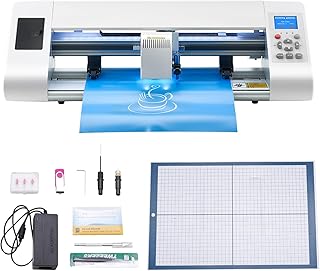
This automatic edge-detection cutter is ideal for users who value precise alignment and ease of use. Best for: DIY crafters and small studios that need reliable pattern following and minimal manual adjustments. It supports multiple file formats via its design software and keeps cuts within a 13″ x 330mm area. Features include ten blade pressure levels and a broad material compatibility range. Limitation: cut size is smaller than the largest 34″ models, which may restrict very large designs.
Silhouette Cameo 5 Alpha

The Cameo 5 Alpha focuses on precision and workflow efficiency. Best for: users who require top-tier accuracy for stickers, heat transfers, and printed designs. It features a 4-point registration system, vertical/horizontal corrections, and optimized cutting order via Intelligent Path Technology. The Fast Sketch Mode speeds up design-to-cut workflows. Caution: advanced features may have a steeper learning curve for absolute beginners.
<a href="https://www.amazon.com/sspa/click?ie=UTF8&spc=MToxNzMxNjM3MjY2NDQzNzk3OjE3ODkwOTE0Njc6c3Bfc2VhcmNoX3RoZW1hdGljOjMwMDY4MDc5ODE3NjcwMjo6MDo6&url=%2FLiene-Sticker-Printer-Cutting-Machine%2Fdp%2FB0DHKZ3CCL%2Fref%3Dsxin_15_pa_sp_search_thematic_sspa%3Fcontent-id%3Damzn1.sym.a2d8fef6-2d68-4a6a-b5d9-51823ece2f68%253Aamzn1.sym.a2d8fef6-2d68-4a6a-b5d9-51823ece2f68%26cv_ct_cx%3Dhome%2Bvinyl%2Bcutting%2Bmachine%26keywords%3Dhome%2Bvinyl%2Bcutting%2Bmachine%26pd_rd_i%3DB0DHKZ3CCL%26pd_rd_r%3D6bf7ba0c-4193-4e80-99e0-eec1bd76ccae%26pd_rd_w%3Dy5Hhh%26pd_rd_wg%3DYS48M%26pf_rd_p%3Da2d8fef6-2d68-4a6a-b5d9-51823ece2f68%26pf_rd_r%3DTY36SY3H4GAHEBK54TQ0%26qid%3D1789091467%26sbo%3DRZvfv%252F%252FHxDF%252BO5021pAnSA%253D%253D%26sr%3D1-1-bbb9804a-c7e9-4d92-96ec-63fab7f26c09-spons%26aref%3D4IQNqANrL2?tag=beadbramble-20
The Liene PixCut S1 combines a printer and cutter in one, enabling on-demand sticker production and small-label creation. Best for: designers who want quick turnarounds for custom labels, gift tags, and small gifts. It supports thermal dye-sublimation and precise AI auto-cutting, making it convenient for complex shapes. Limitation: data indicates a broad feature set, but actual material handling can depend on the chosen media and print workflow.
Cricut Joy Xtra

The Cricut Joy Xtra is a compact, versatile cutting machine designed for quick projects and space-saving setups. Best for: crafters who value portability and a broad Design Space ecosystem, including 50+ materials and draw-and-cut capabilities. The bundle includes essential tools and a design space integration, enabling quick practice cuts and personalized items. Limitation: smaller cutting area compared to larger desktop cutters, which may require more tiling for big designs.
Buying Guide: How to Choose the Right Vinyl Cutter
What should you consider before buying a vinyl cutter? Start with cutting width and media compatibility. If you regularly craft large decals or signs, prioritize models with wide feed and stable feed systems. For precise designs, look for advanced alignment features and adjustable blade pressure. Software compatibility matters; choose machines that pair with your preferred design programs (SVG, EPS, AI, PLT) and offer easy export options. Noise level, workspace footprint, and ease of setup are practical concerns for home use. Durability and spare parts availability can affect long-term value.
Frequently Asked Questions
- What’s the easiest vinyl cutter to start with? A compact, beginner-friendly model with guided software and templates helps new users learn quickly.
- Do these machines work with standard vinyl for decals? Yes, most support adhesive vinyl, HTV, and general sticker media common in home crafts.
- Can I cut large designs at home? Yes, but require a cutter with a wide feed and stable material handling for consistent results.
- Is auto-edge detection useful for beginners? It helps maintain alignment, reducing manual adjustments and improving accuracy.
- Do these units also print or only cut? Some combine printing and cutting (like Liene PixCut S1) or drawing (like Cricut Joy Xtra in Design Space).
- Will I need software subscriptions? Some bundles include design software or trial access; others rely on downloadable design formats and compatible editors.
Add a Comment