The best low-temperature heat presses offer a controlled setting suited to transfers that call for less heat. The Calogy and HTVRONT mini presses both list a 284°F low setting, making them useful choices for small projects. The Cricut EasyPress Mini is designed for detailed personalization, though its listed features do not specify a temperature range. For larger work, the VEVOR digital press lists a wide adjustable range, while the HTVRONT Auto Heat Press offers hands-off pressing but does not state its minimum temperature.
| Product | Best For | Low-Temperature Detail |
|---|---|---|
| Calogy Mini Heat Press | Small crafts with a stated low setting | 284°F low setting |
| HTVRONT Mini Heat Press | Small HTV and sublimation projects | 284°F low setting |
| Cricut EasyPress Mini | Detailed personalization | Temperature range not listed |
| VEVOR 12 x 10 Digital Press | Small fabric projects and adjustable settings | Range starts at 32°F |
| HTVRONT Auto Heat Press | Larger projects and automated pressing | Minimum temperature not listed |
Calogy Mini Heat Press

Best for: Small craft transfers where a clearly stated low setting matters. Calogy lists three temperature levels: 284°F, 320°F, and 356°F. Its compact body and 2.87 x 4.43-inch heat plate are suited to focused work on items such as hats, pillows, or small areas of fabric.
The single-button control handles temperature adjustment, unit switching, and power. This press was selected because its feature list explicitly identifies a 284°F low setting, making its temperature options easier to compare with a project’s transfer instructions.
Limitation: The small plate is not designed for quickly pressing large designs. Confirm that 284°F is appropriate for the specific transfer material before use.
HTVRONT Mini Heat Press
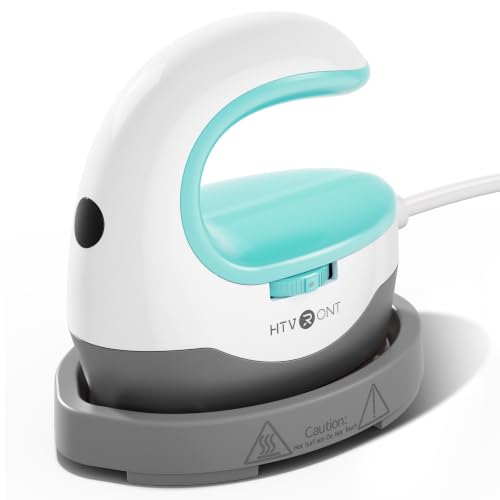
Best for: Small HTV and sublimation projects that call for a low setting. The HTVRONT mini press has three heat settings: 284°F, 320°F, and 356°F. A sliding control switches between settings, and the manufacturer describes the compact format as useful for small or uniquely shaped projects.
Choose this model if you want a mini press with a clearly specified 284°F option and simple knob-based switching. Its listed features also emphasize quick heating and a handle intended to provide a steady grip.
Limitation: The listed features do not give the heat plate dimensions, so check the product details if the working area is important. Its mini format is better for small transfers than broad shirt designs.
Cricut EasyPress Mini
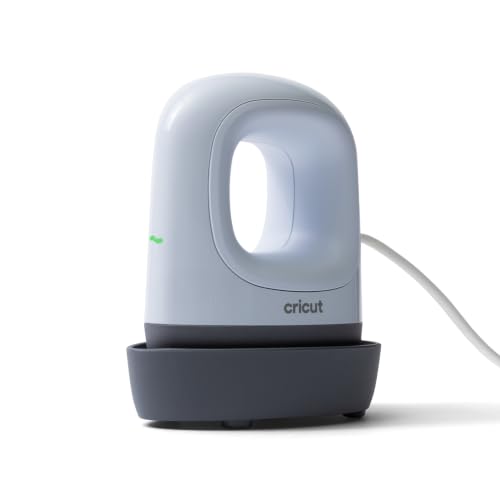
Best for: Small, detailed heat-transfer vinyl projects that need a compact tool. Cricut describes this mini press as suitable for personalized projects and provides a Heat Guide with material and blank information, time settings, and pressing instructions.
This option was selected for buyers who value project guidance and a small format for detailed work. It may be easier to maneuver around a compact design than a full-size press.
Low-temperature note: The provided product features do not state the press’s temperature range or confirm a specific low-temperature setting. Choose it only after checking that the Cricut Heat Guide’s instructions match the temperature needs of your material.
VEVOR 12 x 10 Digital Heat Press

Best for: Buyers who need a larger press with adjustable temperature and time controls. VEVOR lists a 12 x 10-inch work area and a temperature range of 32°F to 450°F, along with a timer range of 0 to 999 seconds. The manufacturer describes it for T-shirts, canvas bags, pillowcases, and other small fabric projects.
Its broad stated temperature range makes it more adjustable than the mini presses, while the larger plate suits wider transfers. Digital controls let users set time and temperature according to material requirements.
Limitation: A low minimum on the control range does not mean every transfer can be applied at that temperature. Follow the transfer maker’s instructions, and account for the larger machine footprint.
HTVRONT Auto Heat Press

Best for: Larger projects where automatic pressing and release are priorities. This 15 x 15-inch press adjusts to project thickness up to one inch, according to its listed features, and releases automatically when the timer finishes. It includes fast, custom, and auto modes.
This model offers a substantially larger work area than the mini presses and may suit users making clothing, accessories, or décor. Its listed heating details include reaching 320°F in four minutes, along with a dual-tube heating system and NTC thermistor technology.
Low-temperature note: The supplied product information does not state the minimum temperature or confirm a 284°F setting. Check the full control specifications before choosing it for transfers that require a low-temperature process.
Buying Guide: Choosing A Low-Temperature Heat Press
What temperature does your transfer require?
Start with the transfer or material manufacturer’s instructions. A press’s lowest setting must meet the project’s requirements, but temperature alone does not determine a successful transfer. Time, pressure, material thickness, and application method can also matter. Among the listed products, Calogy and HTVRONT Mini explicitly offer a 284°F setting. The VEVOR digital model lists a range beginning at 32°F, but buyers should verify how its controls work and follow transfer-specific instructions.
Should you choose a mini or full-size press?
Mini presses are easier to position on small designs, narrow areas, and compact items. Their smaller plates cover less area per press, so large graphics may take more repositioning. A 12 x 10-inch or 15 x 15-inch model covers a broader surface, but takes up more workspace. Choose based on the size and shape of the projects you make most often.
How important are controls and automation?
Simple preset levels make it easy to switch between a few temperatures. Digital controls offer a wider stated range and timer adjustment. Automatic pressing can reduce the need to hold a press manually, but it does not replace checking temperature, time, and material requirements.
Frequently Asked Questions
Which listed press explicitly offers a 284°F setting?
The Calogy Mini Heat Press and HTVRONT Mini Heat Press both list 284°F as their low setting.
Is a lower minimum temperature always better?
No. Use the temperature specified for the transfer and material. A lower setting may not apply every transfer correctly.
Can a mini heat press handle a large shirt design?
A mini press can be used for small sections, but its compact plate means larger designs may require multiple placements. A larger press is generally more practical for broad designs.
Does the Cricut EasyPress Mini list a low-temperature setting?
The supplied product features do not specify its temperature range. Check the manufacturer’s current instructions before buying it for a low-temperature project.
What should I check before pressing a transfer?
Confirm the material’s recommended temperature, pressing time, and method. Check that the press can meet those requirements and use suitable protection for the work surface and project.
Add a Comment