Paper with rounded corners is available ready-made for invitations and notes, or you can round the edges of your own paper with a corner punch. The Hamilco cardstock is best for printable 5-by-7-inch cards, while Vantasii’s small blank cards suit quick notes and labels. For DIY projects, QIQQIKIN, TONOS, and MECHEER offer three corner-radius options, with MECHEER specifying a material thickness range.
| Product | Best For | Key Detail |
|---|---|---|
| Hamilco 5 x 7 Cardstock | Invitations and stationery | Pre-rounded, printer-compatible cards |
| Vantasii Blank Cards | Notes and flash cards | 200 small rounded-corner cards |
| QIQQIKIN 3-in-1 Punch | Adjustable craft projects | 4 mm, 7 mm, and 10 mm radii |
| TONOS Corner Punch | Photos and scrapbooks | Three selectable corner sizes |
| MECHEER Corner Punch | Thin paper and laminate | Thickness guidance included |
Hamilco 5 x 7 Rounded Corner Cardstock

Best for: Invitations, thank-you notes, postcards, and other projects that need ready-made 5-by-7-inch cards. This is the most direct choice if you want paper with rounded corners without cutting the edges yourself.
The cards are white, smooth on both sides, and listed as 80-pound cover stock at 216 GSM. The product description says the paper is acid-free and made in the USA. It is designed for laser and inkjet printers; the listing recommends selecting a cardstock or heavy-paper setting and using a rear or manual feed tray when available.
Limitation: The cards come in one stated size and color, so they may not suit projects that require a different format or custom corner radius.
Vantasii Blank Rounded Corner Cards
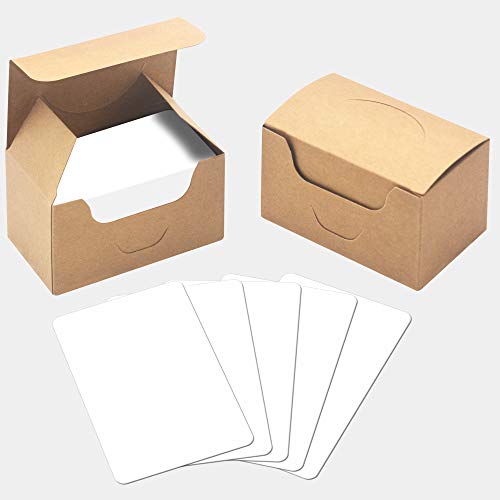
Best for: Compact notes, word cards, gift messages, and index-card-style uses. This option arrives with rounded corners already cut and provides 200 blank cards measuring 3.5 by 2.1 inches.
The cards are described as thickened kraft cardstock, with one smooth side and one side with an easy-to-manipulate texture. The blank format leaves room for handwriting, labels, or simple craft designs. Two boxes are included for storage or distribution.
Limitation: The small dimensions make these cards unsuitable when you need a full-size invitation or large writing area. The supplied details do not specify printer compatibility.
QIQQIKIN 3-in-1 Corner Rounder
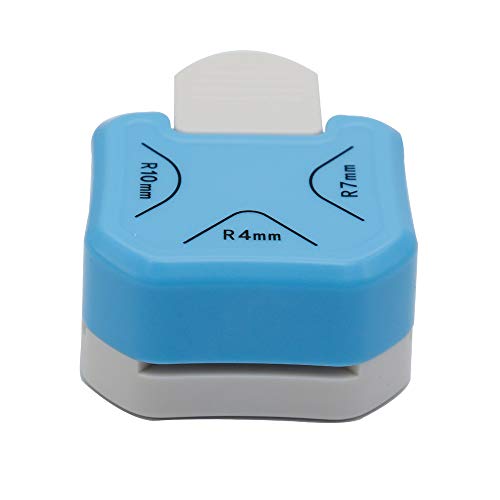
Best for: Crafters who want to round their own paper and choose among small, medium, and large corners. The three listed radii are 4 mm, 7 mm, and 10 mm, giving it more flexibility than a single-size cutter for cards, scrapbooks, and journaling projects.
The punch is described as using a zinc-alloy and ZBS construction with a stainless-steel cutter blade. To use it, insert a paper corner into the slot against the guides and press the handle. That simple guided approach makes it a practical choice for repeated craft cuts.
Limitation: The supplied product information does not state a maximum material thickness. Check that your chosen paper or laminate fits the slot before cutting a batch.
TONOS Three-Size Corner Punch

Best for: Paper crafters who want three radius choices for scrapbook pages, photos, gift tags, or cardstock projects. The listed sizes are 4 mm, 7 mm, and 10 mm, matching the range offered by the other multi-size punches in this guide.
The compact handheld design is intended for quick cuts. The instructions say to turn the punch upside down so the alignment area is visible, fit the paper corner into the opening, and press the handle. Choose this if seeing the paper position while lining it up is useful for your craft workflow.
Limitation: The product details do not specify a supported material thickness. Avoid assuming it will cut every type of laminate or heavy stock without checking the fit.
MECHEER Corner Punch for Thin Materials

Best for: Buyers who want a three-size cutter with explicit thickness guidance. The punch makes 4 mm, 7 mm, and 10 mm corners and is described for paper, photos, and thin plastic. The listing gives a material range of 0.1 mm to 0.4 mm, approximately one to four sheets of standard A4 printing paper.
Its compact design is intended for storage in a craft bag, backpack, or drawer. The stated radius examples connect 4 mm with business cards, 7 mm with 4-by-6-inch photos, and 10 mm with scrapbook pages.
Limitation: The listed thickness range is narrow. The product instructions caution against soft, uneven material and recommend keeping laminate corners flat with neat edges.
Buying Guide: How to Choose Rounded-Corner Paper
Should you buy pre-rounded cards or a corner punch?
Choose pre-rounded cardstock when you need a consistent finished size for invitations, notes, or printing. A punch is more suitable when you already have paper, photos, or craft materials and want to customize their edges. Ready-made cards save a cutting step; a punch offers more control over project size and corner radius.
Which corner radius works for your project?
A 4 mm radius makes a smaller curve, while 7 mm and 10 mm create progressively broader corners. Consider the shape of the finished piece and how prominent you want the rounded edge to look. If you are unsure, a three-size punch lets you compare options on scrap paper first.
What should you check before cutting cardstock or laminate?
Review the punch’s stated material guidance and test one corner before processing multiple pieces. Thickness, stiffness, and a flat, well-aligned edge can affect whether the material fits and cuts cleanly. MECHEER provides a specific 0.1-to-0.4 mm range; the other featured punches do not list a maximum thickness in the supplied details.
Do you need printer-compatible paper?
For printed invitations or cards, select stock explicitly described as compatible with your printer type. Hamilco lists laser and inkjet compatibility and recommends heavy-paper settings and a rear or manual feed tray when available. Blank cards without stated printer guidance may be better suited to handwriting or other uses unless you verify fit with your printer.
Frequently Asked Questions
What does a corner rounder do?
A corner rounder cuts off a sharp paper corner to create a curved edge. Multi-size punches offer different radii for varied looks.
Can a corner punch cut laminated paper?
Some listings describe use with laminate, but material thickness and finish matter. Check the tool’s stated limits and test a flat, neatly trimmed corner first.
Which option is ready to use without a cutter?
Hamilco and Vantasii sell cards with rounded corners already formed. Hamilco is a 5-by-7-inch cardstock option, while Vantasii provides smaller blank cards.
Are all rounded-corner cards printer-ready?
No. Hamilco specifically lists laser and inkjet printer compatibility. The supplied Vantasii details do not specify printer compatibility.
How can I get consistent corners with a punch?
Seat each paper corner snugly against the punch’s alignment guides before pressing. Use the same radius and positioning for every corner in a batch.
Add a Comment