The best ribbon printer for a florist depends on whether you need simple personalized messages, multiple ribbons printed at once, or broader shop-label capabilities. Pianotlbosx is suited to custom messages and flexible device connections, SYSXLT offers multi-row printing, and MIRRSSET is designed for ribbons plus labels and tags. Compare supported ribbon widths, operating-system requirements, print resolution, and output speed before choosing.
| Printer | Best for | Key detail |
|---|---|---|
| Pianotlbosx Ribbon Printer | Personalized florist ribbons | 300 DPI; USB and Bluetooth options |
| SYSXLT Ribbon Printer | Multiple ribbons in one pass | Single- to four-row printing |
| MIRRSSET Satin Ribbon Printer | Shop labeling and packaging | Ribbons, labels, and hang tags |
| factildfulzhan Satin Ribbon Printer | 12–20 mm ribbon workflows | Four-column printing |
| JXUANMM Satin Ribbon Printer | Different ribbon-width needs | Single-, double-, and four-row models |
Pianotlbosx Ribbon Printer For Custom Messages

This model is best for florists who want to print short, personal messages on satin ribbon for bouquets, gifts, and event favors. Its listed features include 300 DPI printing, an app, USB and Bluetooth connectivity, and support for Windows, macOS, Android, and iOS devices. The product also lists a 15-language interface and an English manual with a setup video.
Choose this printer if device flexibility and message personalization matter more than printing several ribbons simultaneously. The stated Bluetooth limitation is important: Bluetooth is not compatible with macOS laptops, so Mac users should check the available connection method before buying.
SYSXLT Printer For Multi-Row Ribbon Printing
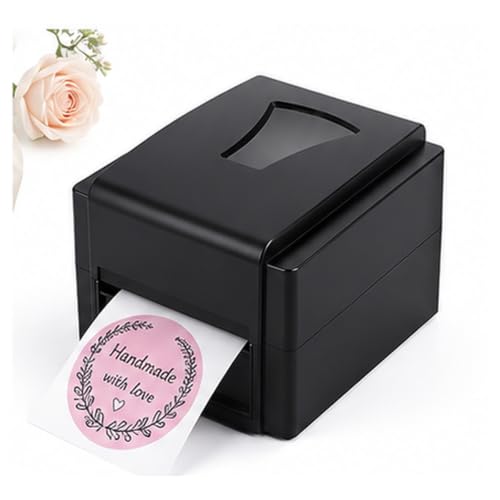
The SYSXLT is best for a flower shop or event business that wants to produce several narrow ribbons in one pass. Its listed three ribbon dividers support single- through four-row printing. The printer offers 300 DPI resolution and USB connectivity through an app, with Windows and macOS support stated in the product details.
It is a stronger fit than a single-row option when repeated favors or shop orders require parallel ribbon output. Consider the workflow before choosing it: the provided information describes USB connectivity, not Bluetooth, and does not specify supported ribbon widths.
MIRRSSET Printer For Ribbons And Shop Labels

MIRRSSET is best for florists who also need to label products and packaging. Its listed uses include satin ribbons, product labels, care labels, and hang tags, with support for text, logos, icons, and barcodes. The product specifies 300 DPI resolution and a maximum output speed of 127 mm per second, which may suit recurring shop labeling tasks.
Choose this model if one printer needs to handle both decorative ribbon and business labeling. The supplied feature list does not state supported operating systems, connection types, or ribbon-width range, so confirm those details for your setup before purchase.
factildfulzhan Printer For 12–20 Mm Ribbons
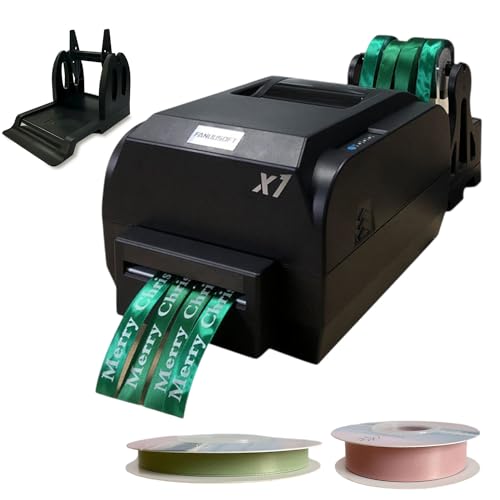
This printer is best for florists working with ribbons in the listed 12–20 mm width range. It supports four-column printing and lists satin, polyester, nylon, and snow gauze ribbons among its compatible materials. Its adjustable print width and stated 200 DPI resolution offer a defined option for shops that want to print several narrow ribbons together.
Choose it when your ribbon stock fits the specified width and thickness range of 0.025–0.9 mm. Its resolution is lower than the 300 DPI models in this guide, and the product details do not specify device compatibility or setup requirements.
JXUANMM Printer With Multiple Row Options

JXUANMM is best for buyers choosing a configuration around ribbon width and production layout. The product lists single-row models for 25–108 mm ribbons, double-row models for 20–50 mm, and four-row models for 10–20 mm. It also specifies 200 DPI resolution, a speed of 150 mm per second, and support for ribbons, polyester tape, nylon tape, and snow gauze tape.
This range makes it a useful comparison for shops that use different ribbon sizes or want parallel output. Check which model configuration is being offered, because row count and supported width vary by model. The listing does not provide operating-system details.
Buying Guide: How To Choose A Florist Ribbon Printer
Start with the ribbon you already use. Measure its width and thickness, then compare those measurements with the printer’s listed range. For example, the factildfulzhan model specifies 12–20 mm widths, while JXUANMM lists different widths for each row configuration. Do not assume a printer supports every ribbon material or width.
Next, match capacity to order volume. A single-row printer may suit occasional personalized bouquets. Multi-row models can print several ribbons in one pass, which may help with repeated favors or busy shop orders. Compare the supported row count and the width assigned to each configuration.
Consider print detail and output speed together. The products here list resolutions of 200 or 300 DPI; higher listed resolution may be useful for fine text or graphics. Only some listings state a speed, so avoid comparing speed where the product details provide no figure.
Check the full workflow before buying: device compatibility, connection type, software, setup instructions, and consumables. If you use a Mac, pay special attention to Pianotlbosx’s stated Bluetooth limitation. For shop use, also decide whether printing labels, barcodes, or hang tags is important alongside decorative ribbon.
Frequently Asked Questions
What is a ribbon printer used for in a flower shop?
A ribbon printer adds custom text, images, or logos to ribbon for bouquets, gifts, events, and packaging. Some models also print labels or tags.
Which listed printer supports printing multiple ribbons at once?
SYSXLT lists single- to four-row printing, while factildfulzhan lists four-column printing. JXUANMM offers configurations with one, two, or four rows.
Do these printers work with every ribbon width?
No. Width support varies by model or configuration. Check the product’s stated width range against the ribbon used in your shop.
Is 300 DPI necessary for florist ribbons?
Not for every job. A higher listed resolution may help with small text or detailed graphics, while simple messages may not require the same level of detail.
What should Mac users check before buying?
Verify both operating-system and connection support. The Pianotlbosx listing says its Bluetooth function is not compatible with macOS laptops.
Add a Comment